Modelship
Your agents already speak OpenAI. Give them a /v1/responses backend you own.
Modelship serves the whole agentic surface — reasoning, tool calling,
server-side conversation state, and MCP servers the gateway calls for you — and
scores 17/17 on the independent
Open Responses conformance
suite. Embeddings, speech, and image generation ride the same /v1. Change the
base URL and your agent runs unchanged, on hardware you control.
Quick start
One command, one model. Pick your hardware.
Linux, Windows, or macOS via Docker. Images are multi-arch (amd64 + arm64).
Needs the NVIDIA Container Toolkit.
Wait for the Deploy … succeeded log line, then talk to it — this hits
the Responses API and streams the model's reasoning as it thinks:
uvx --with httpx llm openai endpoint http://localhost:8000/modelship/v1 \
  -m qwen3-8b --responses "Which is larger, 9.11 or 9.9?"
Add --chat for an interactive session, -T to hand it a tool, or --models
to list what's deployed.
The model serves as qwen3-8b, inferred from the reference. It pulls ~5 GB and
wants ~10 GB of free RAM; --num-cpus 4 reserves four cores for it, so lower it
if the container has fewer (the deploy waits for resources it can't get). On a
small box, swap in lmstudio-community/Qwen3-0.6B-GGUF:*Q4_K_M.gguf.
Deploying several models at once uses a models.yaml instead; one model's
tuning blocks have flags too (--llama-server-config.n-ctx 8192) — see
Model Configuration.
Hitting an error? Check Troubleshooting.
Prefer curl?
curl http://localhost:8000/modelship/v1/responses \
  -H "Content-Type: application/json" \
  -d '{"model": "qwen3-8b", "input": "Which is larger, 9.11 or 9.9?"}'
The response carries both output_text and a first-class reasoning
output item. /modelship/v1/chat/completions is there too, if that's what
your client speaks.
Tip
Always set --shm-size=8g (or higher) — Ray falls back to slower
disk-backed storage instead of /dev/shm if the container's shared memory
is too small for the object store.
Open Responses conformance
/v1/responses is tested against the independent
Open Responses compliance
suite (bun run test:compliance), which drives the endpoint over real HTTP
against a live deployment rather than mocks.
Latest result: 17/17 — every core, compaction, vision, and WebSocket test
(Qwen3-VL-8B-Instruct AWQ 4-bit, vLLM, 2026-10-04).
Loader parity: the vllm and llama_server loaders return the same result
on all 17 tests.
Fourteen cluster guarantees — zero-downtime model cutover, load-driven autoscaling, engine crash recovery, fractional-GPU multi-tenancy, server-side MCP tool loops — are likewise asserted end-to-end against a live cluster with real models over real HTTP. See Verified cluster behaviour.
Why Modelship?
- Conversations that survive the replica that started them —
previous_response_id, reasoning, and tool state live in one store every gateway replica shares: a Ray actor by default, Redis when you want it to outlive the cluster. Scale the gateway out without sharding your users onto specific replicas. - One endpoint for the whole app — chat, embeddings for RAG,
speech-to-text, text-to-speech, and image generation on a single
OpenAI-compatible
/v1, instead of a service per modality. - A stack that fits the hardware you have — allocate GPU fractions per model (70% for the LLM, 5% for TTS), or run the same model CPU-only. vLLM, llama.cpp, Diffusers, sherpa-onnx, and whisper.cpp coexist in one deployment.
- Changes you can ship on a Tuesday — edit the model set and reconcile: models are added, replaced, or dropped incrementally, with a blue-green cutover per model and no gateway restart.
Architecture
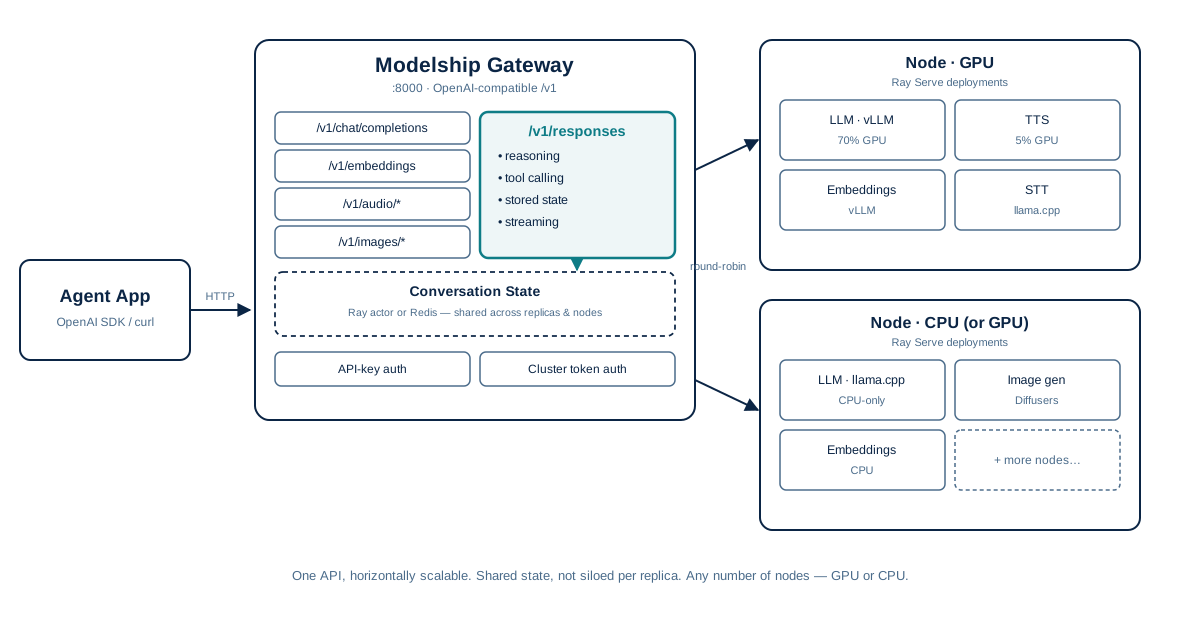
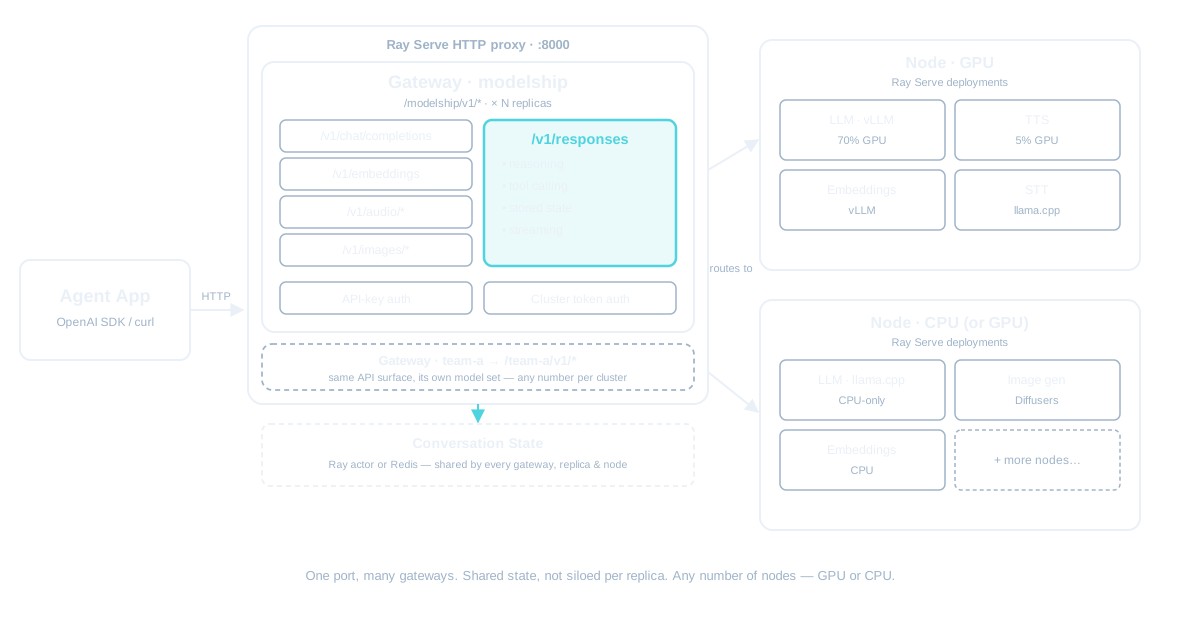
Each model runs as an isolated Ray Serve deployment with its own lifecycle, health checks, and resource budget.
| Backend | Best for | GPU required |
|---|---|---|
| vLLM | High-throughput chat, embeddings, transcription | No — installs on GPU or CPU |
llama.cpp (llama_server) |
High-efficiency quantized GGUF models (chat, embeddings, vision) | No |
| Diffusers | Image generation | Yes |
| sherpa-onnx | TTS (Kokoro) | No |
| whisper.cpp | STT | No |
Models can be deployed across multiple GPUs or run on CPU-only. A model name
maps to one deployment, which scales horizontally with num_replicas
(Ray Serve load-balances across its own replicas); the gateway itself autoscales
with its load, and several gateways can share one cluster and one
port (--gateway-name), each mounted at /<name>/v1 with its own model set.
See Architecture for the full request lifecycle and design.
Supported OpenAI Endpoints
| Endpoint | Usecase |
|---|---|
POST /v1/chat/completions |
Chat / text generation (streaming and non-streaming) |
POST /v1/responses |
Responses API — text, reasoning, client-driven tool calls, server-side MCP tool execution, and stored conversations (streaming and non-streaming) |
GET/DELETE /v1/responses/{id} |
Fetch or drop a stored response (/input_items lists its input); background: true on create + POST .../cancel for queued/pollable runs |
POST /v1/embeddings |
Text embeddings |
POST /v1/audio/transcriptions |
Speech-to-text |
POST /v1/audio/translations |
Audio translation |
POST /v1/audio/speech |
Text-to-speech (SSE streaming or single-response) |
POST /v1/images/generations |
Image generation |
GET /v1/models |
List available models |
Next steps
- Installation — Docker, native, and Helm install guides
- Model Configuration — the full
models.yamlreference - Integrations — connecting the OpenAI SDK, Open WebUI, Dify, n8n, and Responses-speaking agents
- Production Readiness — verified cluster behaviour and the hardening roadmap